


Most non-technical founders find out about email deliverability the hard way.
A customer says they never got the welcome email.
A prospect goes silent and you can’t tell if they’re ignoring you or never saw your reply.
Trial signups drop and nothing on the site has changed.
The root cause is almost always the same.
Your domain is missing the DNS records that tell Gmail, Outlook, and Yahoo you’re allowed to send mail as yourself. Without those records, receiving servers treat your email as suspicious and either filter it to spam or drop it on the floor entirely.
It’s fixable, inexpensive, and not that complicated once you know what you’re looking at.
It just sits on a part of the build that most developers, especially offshore agencies and junior contractors, skip because email infrastructure is a different specialty from writing application code.
If you don’t know to ask for it, you don’t know you’re missing it.
This is a Founder Fluency Pillar 1 gap. Stack, hosting, and DNS sit between your application and the outside world, and the failure modes there don’t show up inside the app where your team is looking.
What deliverability actually depends on
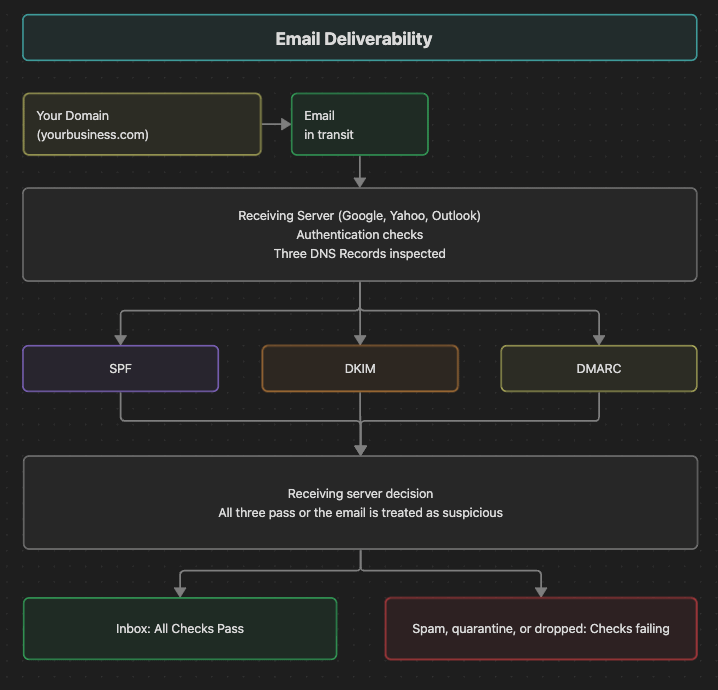
When an email arrives at Gmail or Outlook, the receiving server checks three records on your domain before deciding where to deliver it.
SPF (Sender Policy Framework). SPF is a DNS record that lists which servers are allowed to send email as your domain. If you send through Google Workspace, your SPF record should authorize Google. If you also send transactional email through a service like Postmark or SendGrid, the SPF record should authorize those too. Use one SPF record per domain, with every sender merged into it.
DKIM (DomainKeys Identified Mail). DKIM is a cryptographic signature attached to every outgoing email. The matching public key lives in DNS. The receiving server checks the signature against the public key to confirm the email actually came from your domain and wasn’t tampered with in transit.
DMARC (Domain-based Message Authentication, Reporting, and Conformance). DMARC is the policy that tells receiving servers what to do if SPF or DKIM fail. It supports three modes:
p=none(monitor only, deliver as normal)p=quarantine(send to spam)p=reject(don’t deliver at all)
Start at p=none with a reporting address so you can see what’s happening, then move to stricter policies once your DMARC reports are clean.
If any of these three records are missing or wrong, your email looks like spoofing to the receiving server. Gmail and Outlook deprioritize it, filter it to spam, or reject it outright.
From the sending side, the failure is invisible: no bounce, no error message, no signal inside your application that anything went wrong. The email just doesn’t land.
That silence is the part founders underestimate. Most product failures generate visible signal inside your system. Email deliverability lives outside that loop, in receiving servers you don’t control, so the same signals never reach you.
The deadline already passed
Every major inbox provider now treats this as a compliance requirement. In February 2024, Google and Yahoo both started requiring SPF, DKIM, and an aligned DMARC policy for any domain sending more than 5,000 messages per day to personal accounts on their services. Microsoft followed for outlook.com, live.com, and hotmail.com in May 2025, with the same 5,000-per-day threshold.
Gmail spent most of 2024 ramping enforcement gradually. In November 2025, it shifted from temporary delivery delays to outright rejection for non-compliant traffic. Microsoft’s policy went straight to rejection the day it took effect.
Five thousand messages per day sounds like a lot until you do the math. Welcome emails, password resets, order receipts, and a weekly newsletter to a list of 30,000 trip the threshold the day the newsletter goes out, and the Gmail, Yahoo, and Outlook buckets are counted separately. The “we’re too small to worry about this” line stopped working the day those deadlines took effect.
Why your team probably missed it
Setting up SPF, DKIM, and DMARC properly takes about two hours if someone has done it before. It gets missed because the failure happens after the email leaves your application, in receiving servers your team doesn’t control. From the engineer’s seat, everything inside the build looks fine.
Most teams put their review effort into application code, so a DNS configuration that was correct in 2023 stays untouched even as the standards on the receiving side move past it.
If your dev arrangement predates February 2024 and nobody pulled DNS into a review since, you’re almost certainly shipping out of compliance with at least one of the big three inbox providers.
That’s also why this falls cleanly into Pillar 1 of Founder Fluency. Stack and infrastructure questions are the ones a founder can’t diagnose by looking at the app, because the app isn’t where the problem is.
A founder who knows enough to ask about the DNS records catches the gap in one conversation. That single question is the difference between a fixed problem and months of silent revenue.
Four questions to ask your dev
“Show me our SPF, DKIM, and DMARC records on our sending domain.” They should be able to produce these in five minutes. If they have to ask what those are, that’s information.
“Run our domain through mail-tester.com. What’s the score?” Mail-tester is free. You send one email to the address they give you, and the tool grades it out of 10 with specific notes on what’s wrong. You want 9/10 or 10/10. Anything lower means something is misconfigured.
“What’s our DMARC policy?” At minimum
p=nonewith a reporting address likerua=mailto:youraddress@yourdomain.comso you can see authentication failures as they happen. Better isp=quarantineorp=rejectafter a few weeks of clean reports.“Are we sending transactional email and marketing email from the same domain?” Usually you don’t want to be. Marketing email gets more spam complaints, more unsubscribes, and more aggressive filtering, which means your transactional email (password resets, order receipts, the stuff customers actually need) inherits the worse reputation. Most teams send transactional from the main domain (
yourdomain.com) and marketing from a subdomain (mail.yourdomain.comornews.yourdomain.com).
What to do this week
If you’ve never checked any of this, run the test yourself. Send an email from your business domain to a personal Gmail account. If it lands in spam, in Promotions, or nowhere at all, you have a problem that’s almost certainly costing you deals you’ll never hear about.
Then run mail-tester.com on the same sending address. If you score below 9/10, the tool tells you exactly which records are missing or wrong. Hand that report to your developer.
Verify someone set the three records up correctly, then check the score periodically as you add new sending services. The cryptography itself isn’t your job to understand.
If a developer can’t answer the four questions above, or waves them off as “not important right now,” that’s information about how the rest of your platform is being built. The whole point of Founder Fluency is that you don’t have to take on faith what your team is doing. You can ask one specific question and judge whether the answer holds up.
Email deliverability is the cleanest example of why that matters: two hours of dev work prevents months of silent revenue loss you’d only catch when a customer happens to mention it.
Sources
Google, “Email sender guidelines” (Google Workspace Admin Help): support.google.com/a/answer/81126
Google, “Email sender guidelines FAQ” (November 2025 enforcement update): support.google.com/a/answer/14229414
Yahoo Sender Hub, “Sender Best Practices”: senders.yahooinc.com/best-practices
Yahoo Postmaster blog, “More Secure, Less Spam: Enforcing Email Standards” (October 2023 announcement of Feb 2024 enforcement): blog.postmaster.yahooinc.com
Microsoft, “Strengthening Email Ecosystem: Outlook’s New Requirements for High-Volume Senders” (Microsoft Community Hub, April 2025): techcommunity.microsoft.com
SPF (Sender Policy Framework): RFC 7208, April 2014
DKIM (DomainKeys Identified Mail): RFC 6376, September 2011
DMARC (Domain-based Message Authentication, Reporting, and Conformance): RFC 7489, March 2015
Mail-Tester: mail-tester.com